The short answer
Check in this order: whether the tracking was rebuilt and is counting differently, whether forms lost their hidden fields and are writing poorer records, whether redirects were mapped so the old ranking pages still land somewhere, whether any page is accidentally blocked from indexing, whether form notifications still reach anyone, and whether the new navigation buries the page that used to convert.
Separate the two questions first
Before diagnosing anything, work out which of two things happened, because they have completely different causes.
Either fewer people are arriving, or the same people are arriving and fewer are converting. Traffic and conversion rate answer that in about a minute, and the answer halves the search space.
There is a third possibility worth ruling out immediately: the same number of leads are arriving and you cannot see them. That sounds unlikely until you have watched it happen.
If fewer people are arriving
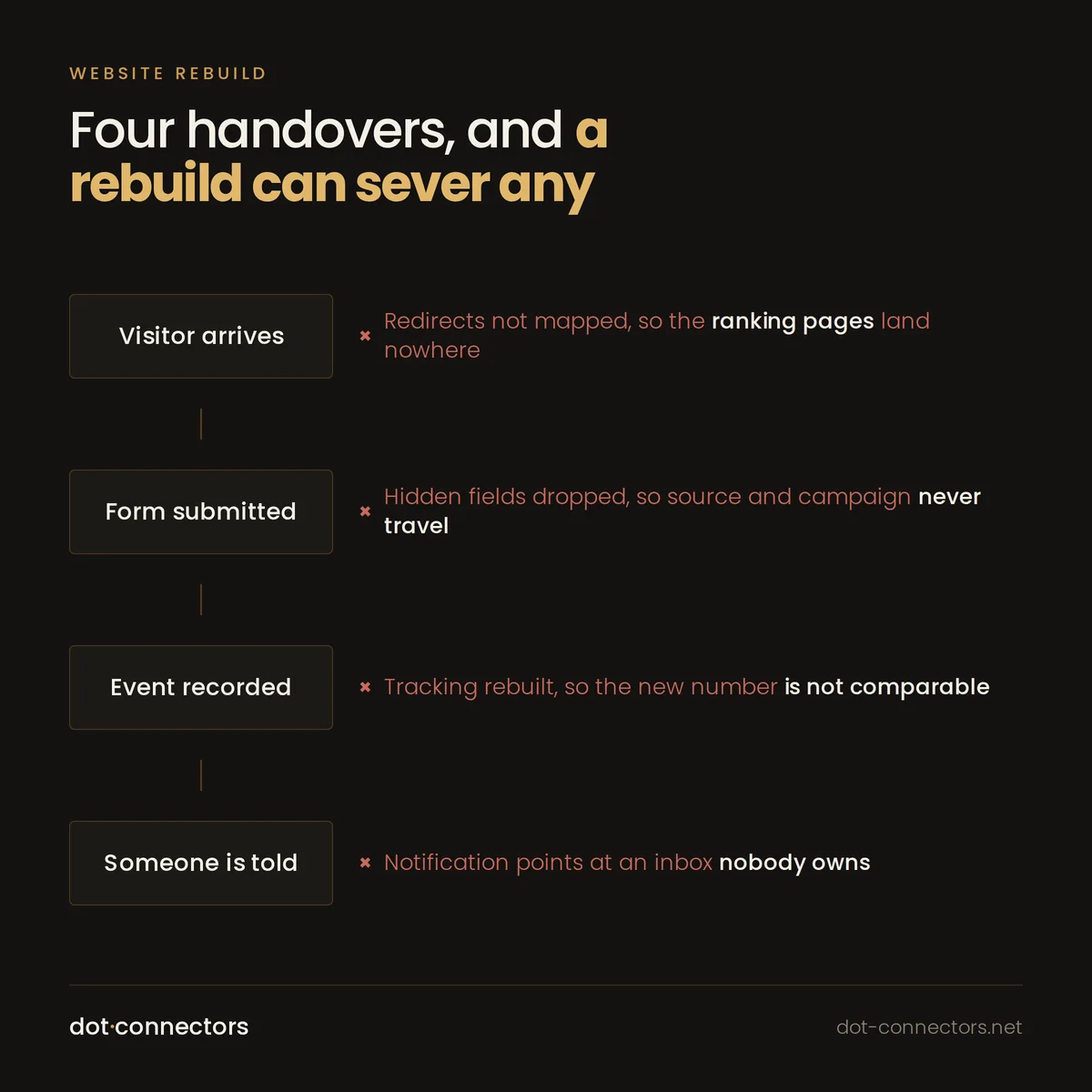
Redirects are the first thing to check and the most commonly done badly. A rebuild usually changes URLs. If the old pages that ranked were not mapped one to one onto their new equivalents, the ranking goes with them. Redirecting everything to the homepage is the classic version of this mistake, and it looks fine in a browser while losing almost all the value.
Then check indexing. Staging sites are usually blocked from search engines, and that block is sometimes carried into production. A noindex tag or a disallow line that nobody noticed will remove you from results within weeks. This is quick to check and embarrassing to find late.
Then check page speed and layout shift, particularly on phones. A rebuild that looks better and loads slower can measurably reduce arrivals.
If the same people are arriving and fewer convert
Start with the form itself, and submit one. Not a glance at it, an actual submission, and then follow where it went.
Hidden fields are the usual casualty. The old form almost certainly carried fields that nobody looked at: source, campaign, the page it was submitted from, a referrer. Rebuilt forms frequently drop them. The lead still arrives, but it arrives without context, so sales deprioritises it and your reporting cannot attribute it. The count looks lower because the quality looks lower.
Then check the notification path. Where does the submission go, who receives it, and is that address still monitored. A form that posts to an inbox nobody owns produces exactly the symptom you are seeing.
Then check required fields. A redesign that added two mandatory fields to look thorough will reduce completions, reliably and in proportion.
If the leads are arriving and you cannot see them
This is the case people dismiss and it is more common than it should be.
Tracking is usually rebuilt from scratch during a redesign, which means event names change. If the old setup counted a conversion on a thank you page and the new one counts a form submit event, the two numbers are not comparable, and the drop may be entirely definitional.
Consent is the other half. If a banner was added during the rebuild, part of your traffic and conversions are now unmeasured by design. That is correct behaviour and it will look exactly like a decline.
The test that settles it: count the actual records created in the CRM over the same period, which is a number that does not care what your analytics thinks. If the CRM count held steady, you have a measurement problem rather than a marketing one.
The order worth working through
- Submit the form yourself and follow it all the way to the CRM record.
- Compare CRM record counts, not analytics conversions, against the same period last year.
- Check the redirect map against your previously ranking pages.
- Check for noindex and robots blocks carried over from staging.
- Compare event definitions old against new before trusting any analytics comparison.
- Check whether consent was introduced at the same time.
Most of what this finds is recoverable in days rather than months, and most of it is invisible from the design, which is why the design keeps getting blamed.
Where this comes from
We do this work
This article is drawn from how we scope and run websites and landing pages. If you recognised your own setup in any of it, that page covers what an engagement looks like, what is included, and what we will not take on.
Also here
More from insights
- Why your HubSpot and Salesforce records do not match Two systems that can both write the same field will eventually disagree. Here is why, and what to do instead.
- Will server-side tagging recover the data you lost to consent? Short answer: no. Longer answer: it fixes several real problems, and it is worth knowing which.
- GA4 revenue does not match your shop platform The two numbers will never match exactly. The goal is a small gap you can explain in one sentence.
- Duplicate contacts in HubSpot, and how to stop them coming back Every cleanup works. Most of them get repeated two years later, because nobody fixed the thing producing the duplicates.
- Lead scoring that sales will actually use If sales ignores the score, the score is wrong. That is the whole feedback loop, and most models never get it.
- Zapier, Make or n8n for a marketing team The feature lists are converging. The real difference is operational, and it shows up in the second year.